
Quick answer: The best consulting website examples do a few things well: a headline naming who the consultant helps, proof (credentials, named testimonials, media) near the first button, one clear call to action repeated through the page, and the founder visible early. The ten sites below, all built by Design Fly 24, each show one of these moves clearly.
Most roundups of consulting website examples pick beautiful agency sites with big budgets and animated hero sections. Nice to look at. Hard to learn from if you’re a solo security consultant or a two person HR advisory firm.
So this list is different. Every site here belongs to a real consultant or expert firm, the kind of practice that wins work through referrals, credentials and trust. We designed and built all of them, so we can tell you why each decision was made, not just how it looks. For each one you get what it gets right and one lesson you can copy into your own site this month.
If you want the element by element checklist instead (headline, services page, booking and so on), read our guide to consultant website design. This post is the visual companion.
Key takeaways
- Name the audience in the headline. Every strong example here says who it’s for within the first screen.
- Put proof near the first button: credentials, stats, named testimonials or media logos.
- Repeat one main call to action in the header, the hero and after key sections.
- Show the founder. For consultants, the person is the product.
- Match tone to the visitor’s state of mind. A worried executive needs calm; a person with a certification deadline needs speed.
Consulting website examples at a glance
| Website | Who it serves | The move worth copying |
|---|---|---|
| HR Expert Consultants | CEOs, boards and attorneys | A separate one click path for each audience |
| Harman PhD Consulting | MedTech founders and investors | Credentials directly under the first call to action |
| Risk Mitigation Technologies | Executives facing threat concerns | One calm, confidential call to action |
| Porter Global Security | Schools, churches, companies, attorneys | Hard credentials in a stats bar on the first screen |
| Eric Sean Clay | Healthcare boards, event planners | Different buttons for different intents |
| Xpandur | Mid market supply chain leaders | Qualifying the visitor on the homepage |
| Secured and Prepared Consulting | Healthcare organizations | Media logos and partner logos as borrowed authority |
| Stone Campus Safety | Districts, colleges, agencies | Naming the standards buyers are measured against |
| JT Public Relations | Producers and theatre companies | Dated, current work that proves the firm is active |
| Westshore E.M.R. | Employers, schools, individuals | A short path to booking for buyers on a deadline |
10 consulting website examples and what to copy from each
1. HR Expert Consultants
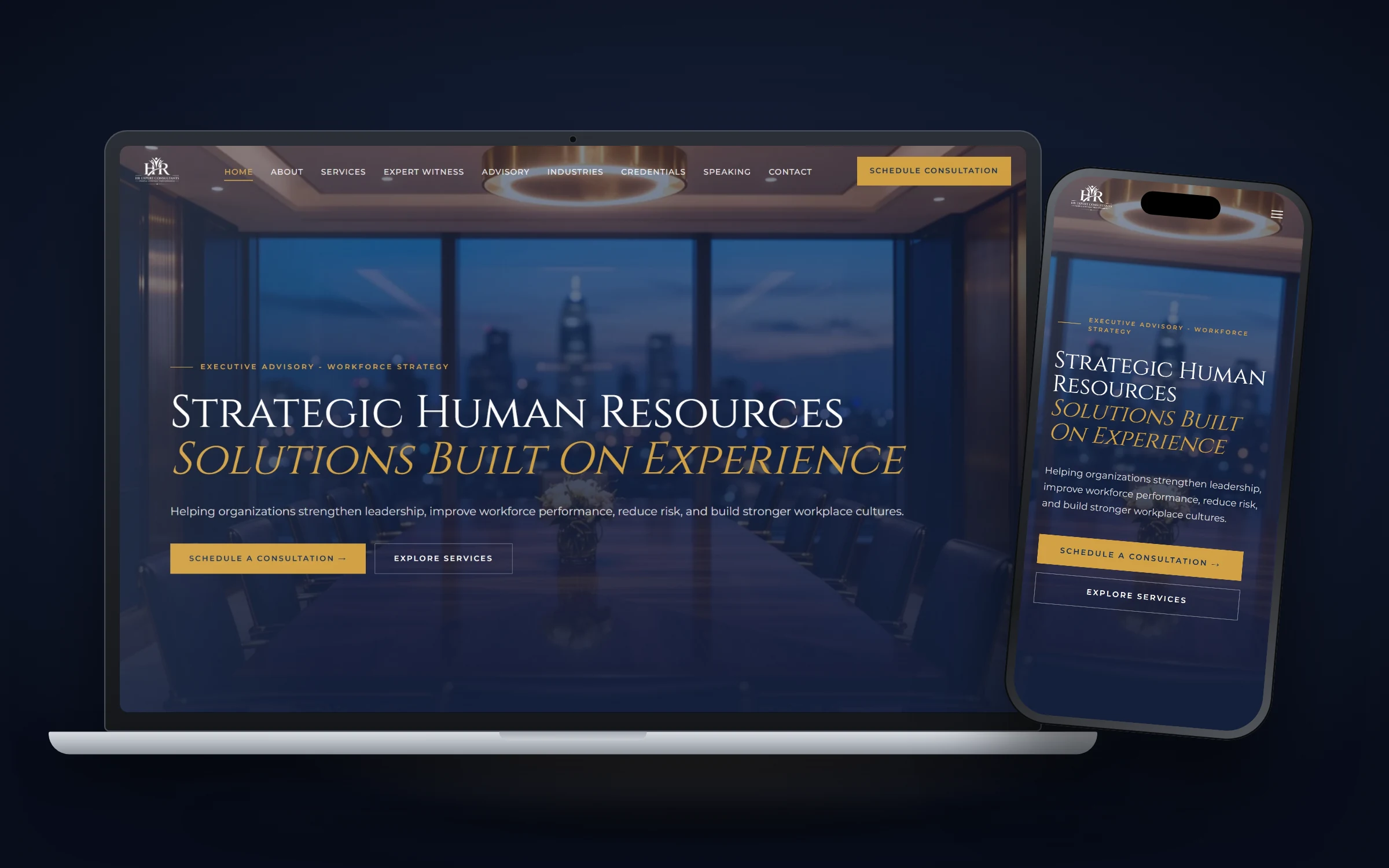
David Morris brings more than three decades of senior HR leadership to two very different buyers: executives and boards who want strategic guidance, and attorneys who need a credible expert witness in HR and employment matters. One homepage can’t speak to both with the same words, so the site gives each audience a direct route to its own page in one click: advisory services, expert witness, credentials, industries and speaking.
What it gets right: credentials shown as scannable cards, a side by side comparison of a strategic advisor versus a traditional HR consultant, and a premium first screen (night skyline boardroom image, gold accents, classical capitals) that signals the level of client he works with. “Schedule a Consultation” sits in the header, the hero and after key sections.
Lesson to copy: If you serve more than one type of buyer, give each a labeled door on the homepage that leads to a page written only for them.
2. Harman PhD Consulting
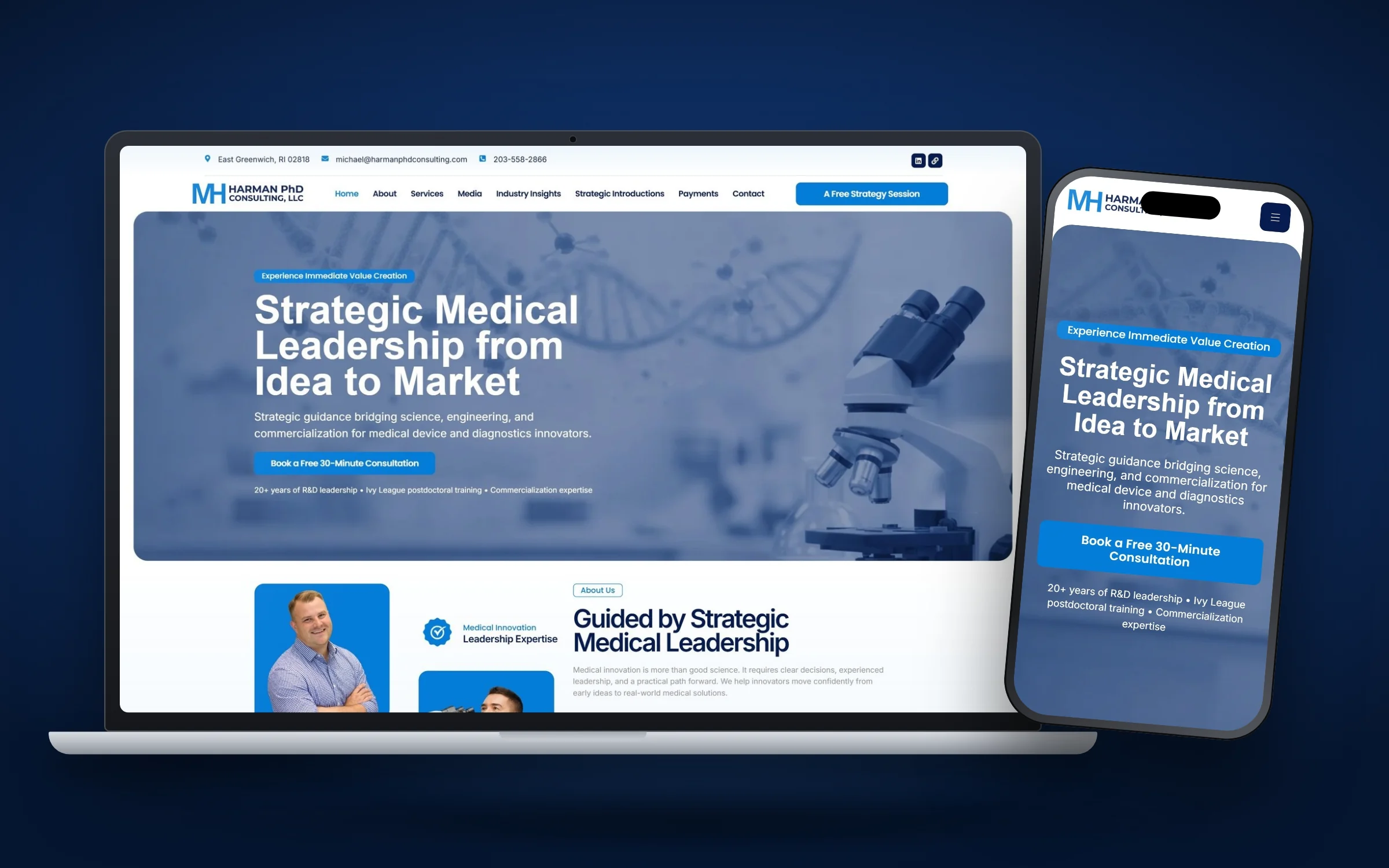
Michael Harman, PhD is a fractional CTO and commercialization advisor for MedTech and diagnostics companies, with more than 20 years of R&D and leadership experience and a clinical postdoctoral fellowship at Brown University and Rhode Island Hospital. His buyers are founders preparing for funding, teams near regulatory milestones and investors who want an independent technical view. They read carefully and check everything.
What it gets right: the headline, “Strategic Medical Leadership from Idea to Market,” covers his whole range in six words. Credentials appear directly under the first call to action. A “Featured In” section lists interviews, articles and research with the source and date for each. Testimonials come from people at GSK, Exact Sciences and Alnylam Pharmaceuticals, with names and titles.
Lesson to copy: Date your proof. “Interview, 2025, [publication]” is far more convincing than a logo with no context.
3. Risk Mitigation Technologies
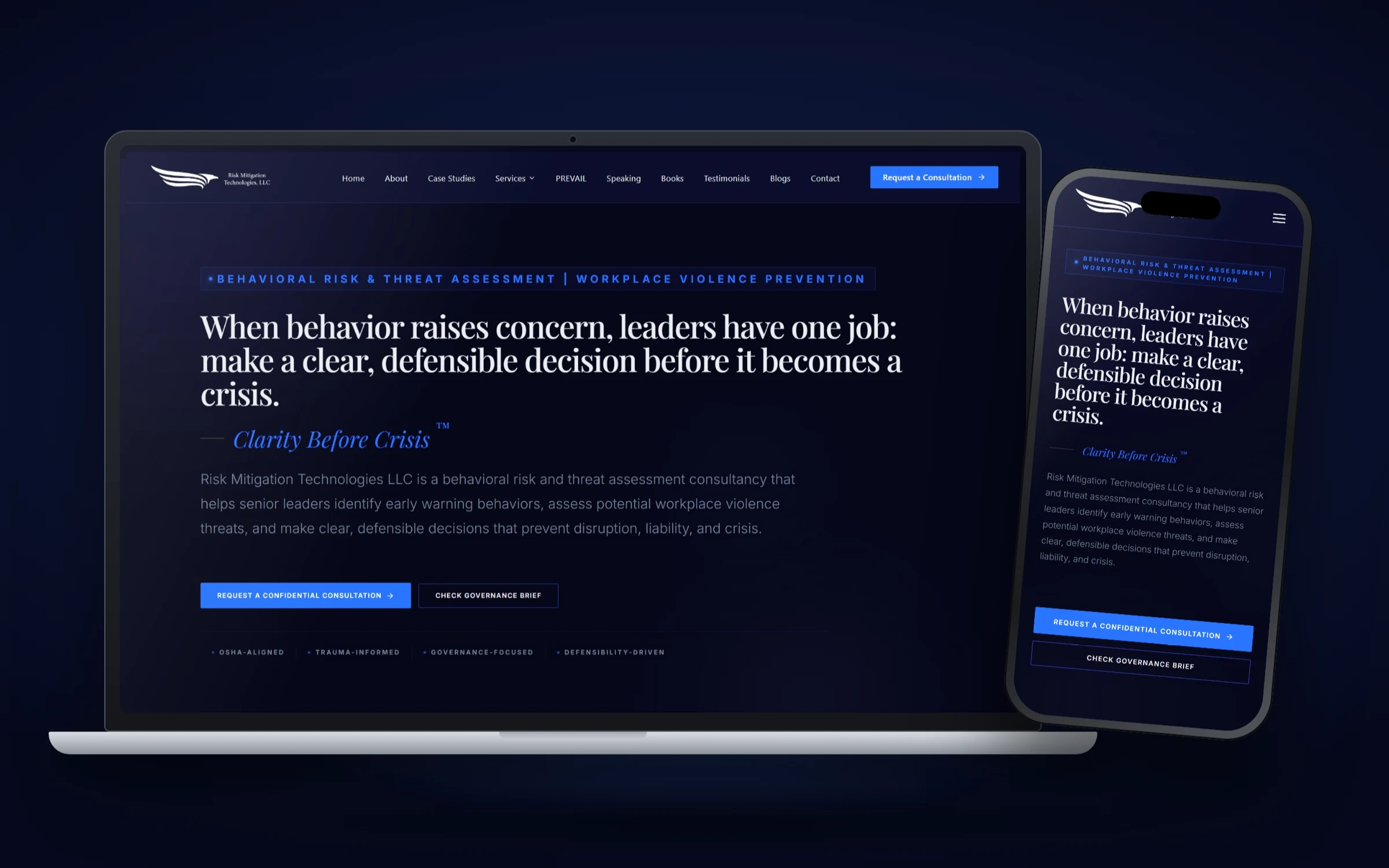
Joseph Paul Manley’s firm helps senior leaders spot early warning behaviors and prevent workplace violence. Visitors are often CEOs, HR leaders or general counsel who are worried about a real person, right now, and need discretion. The old site spread its message thin and had no single obvious next step.
What it gets right: the homepage moves from concern to clarity to consultation. There’s one call to action, “Request a Confidential Consultation,” in the header, the hero and after key sections. Imagery is real photos of the founder in quiet professional settings, deliberately avoiding alarming stock photos. Media features, credentials and the firm’s PREVAIL framework sit high on the page.
Lesson to copy: Write your call to action for the visitor’s emotional state. “Confidential” does more work for a worried executive than any design flourish.
4. Porter Global Security
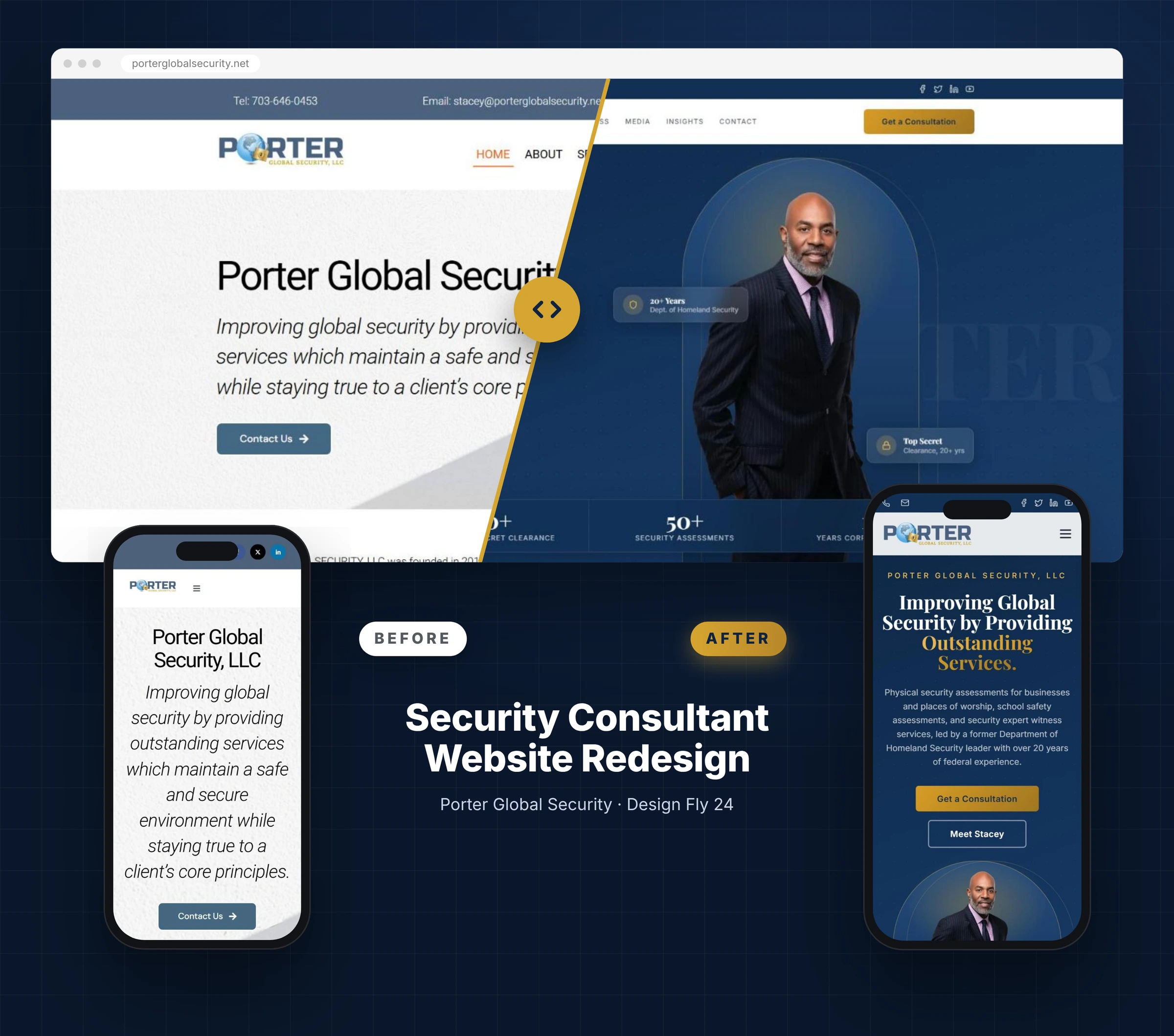
Stacey D. Porter founded Porter Global Security in 2018 after more than 20 years with the Department of Homeland Security, and she held a Top Secret clearance for over two decades. Her old homepage mentioned none of that above the fold. It led with the company name and a long italic sentence.
What it gets right: the redesign puts a stats bar on the first screen (20+ years DHS, Top Secret clearance, 50+ security assessments, 15+ years of experience) with affiliations directly underneath. Services became clean cards, with a highlighted strip for house of worship assessments. Expert witness work got its own page. On mobile, the headline, summary and two buttons all appear before the first scroll ends. Stacey later wrote in a LinkedIn recommendation: “I couldn’t be more pleased with the results.”
Lesson to copy: If you have hard credentials, turn them into three or four short numbers and put them on the first screen.
5. Eric Sean Clay
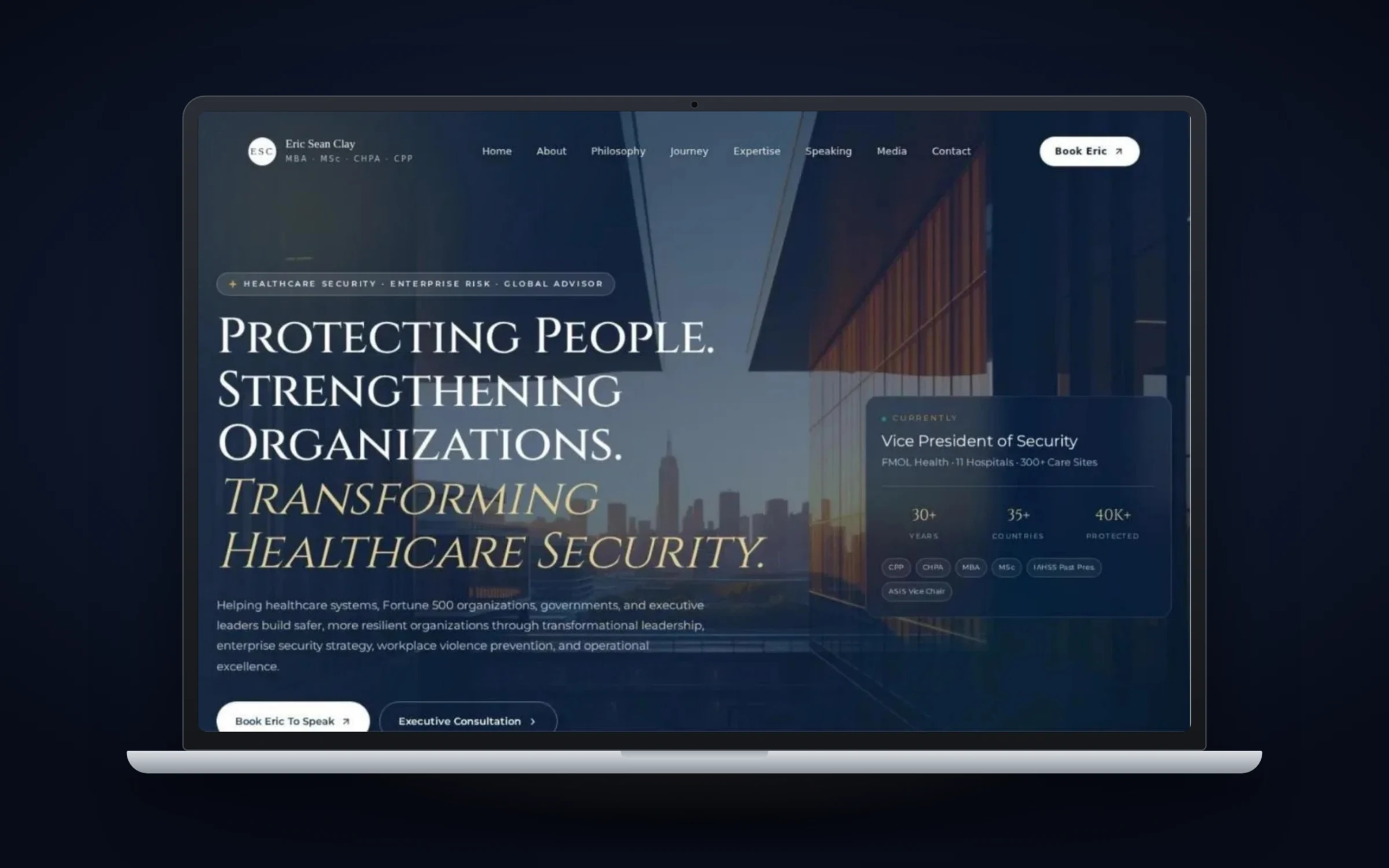
Eric Sean Clay is a healthcare security executive (Vice President of Security at FMOL Health at the time of writing) and a past president of IAHSS, who also speaks, writes and serves as an expert witness. A personal site for someone like this has to carry a lot of credentials without becoming a wall of acronyms.
What it gets right: the headline, “Protecting People. Strengthening Organizations. Transforming Healthcare Security.”, sets the scope at once. A credential strip in the hero and a dedicated certifications row handle the acronyms (CPP, CHPA and more) so the body copy can stay readable. Sections for career journey, speaking, publications, media, awards and board service let each visitor find the proof they care about. And the buttons are split by intent: “Book Eric To Speak” for event planners, “Request a Private Consultation” for organizations, with a note that confidential inquiries are welcome.
Lesson to copy: If people hire you for different things, give each intent its own button and label it in their words.
6. Xpandur
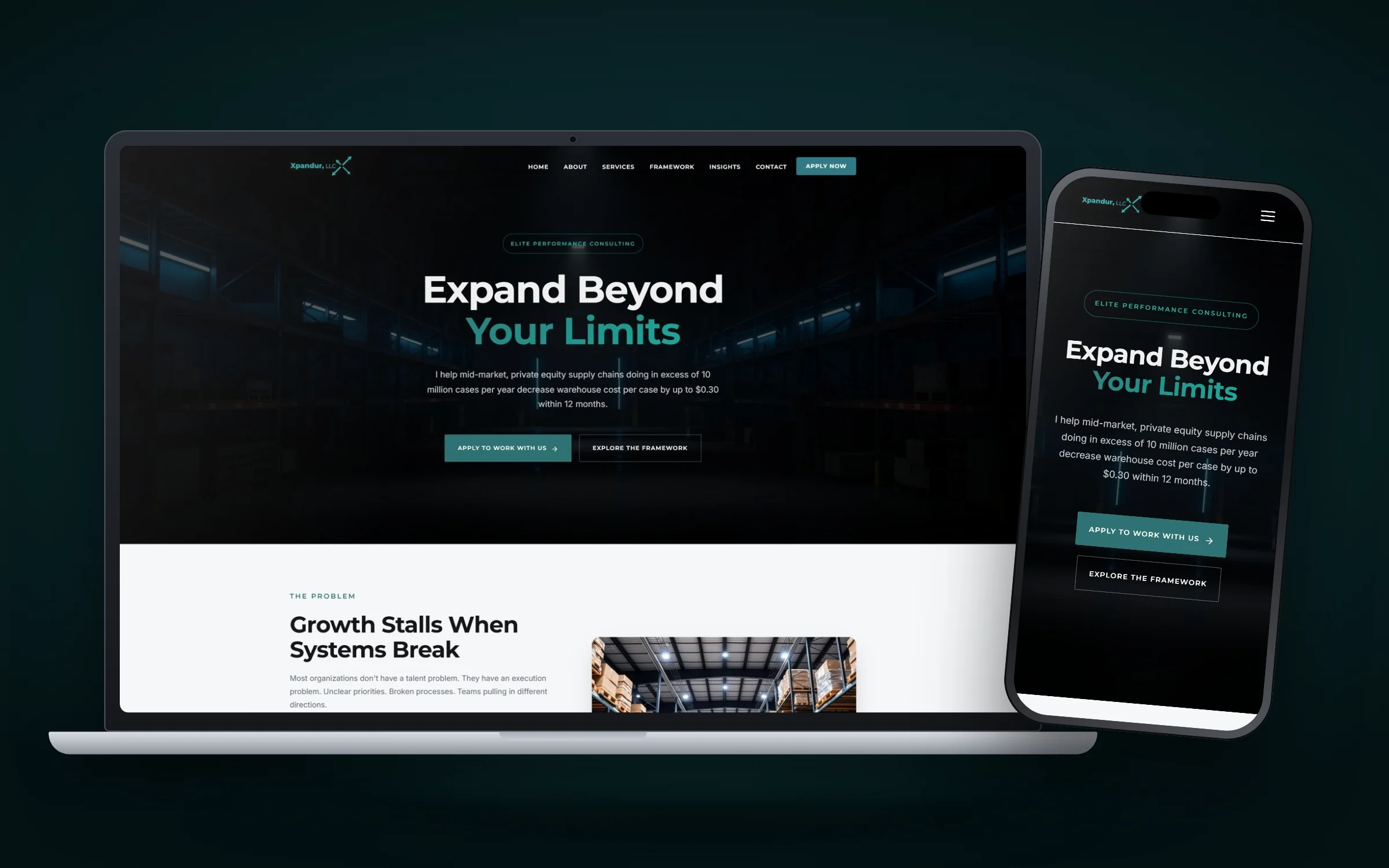
Xpandur works with mid market, private equity backed supply chains handling more than 10 million cases a year, helping them lower warehouse cost per case. That’s a very specific buyer, and the homepage says so plainly instead of hiding behind “operations consulting.”
What it gets right: a problem section that argues stalled growth usually comes from execution gaps, a founder section, four clear service pillars (Strategy, Execution, Systems, Performance), quantified results such as an 89% improvement in on time dispatch, testimonials from named colleagues with titles, and a “Who This Is For” section. The call to action is “Apply Now,” and the closing section notes that the firm takes on a limited number of clients each quarter.
Lesson to copy: Qualify on the homepage. Saying who you’re for (and implying who you’re not for) makes the right buyer lean in.
7. Secured and Prepared Consulting
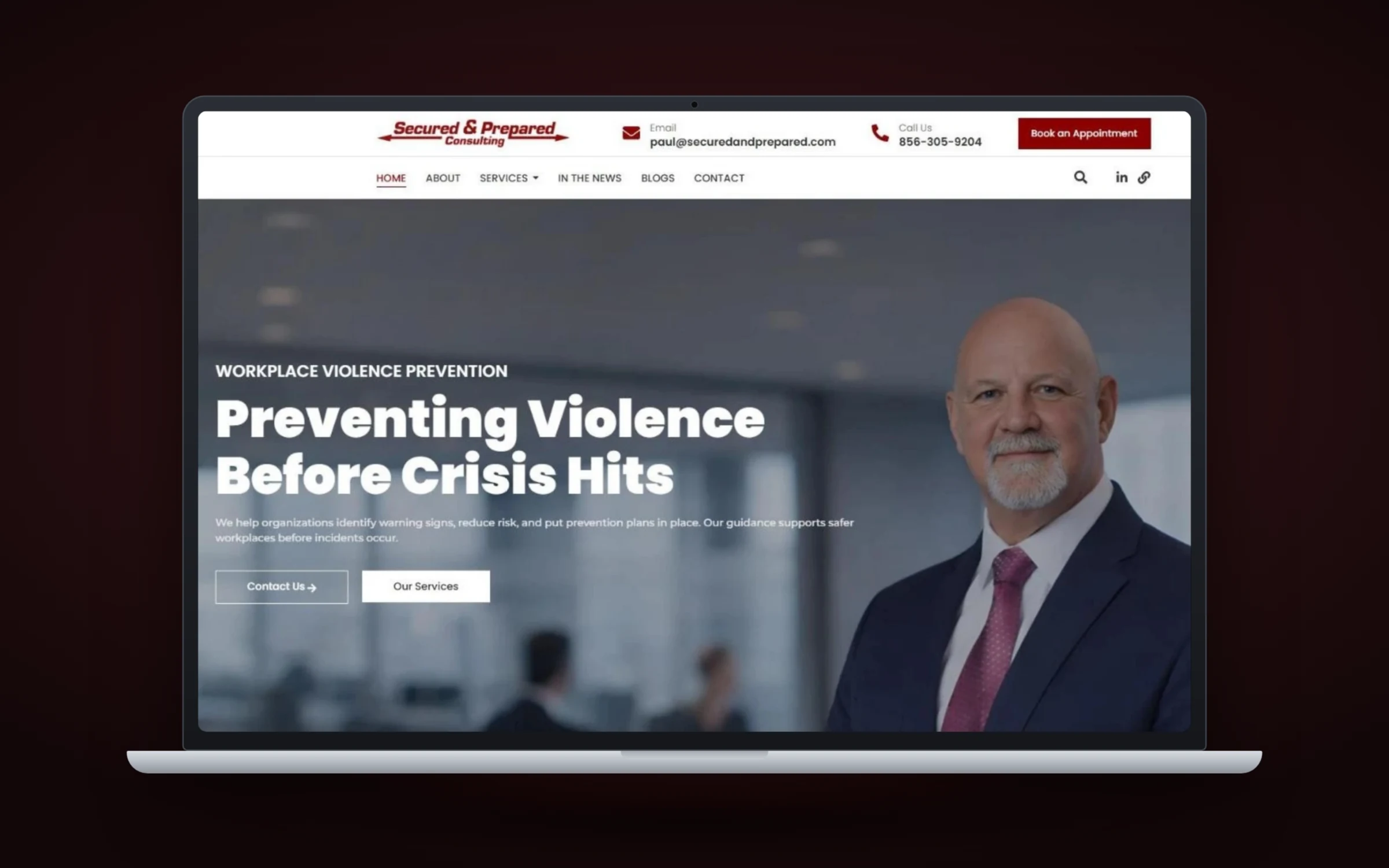
Secured and Prepared Consulting focuses on workplace violence prevention and security for healthcare organizations, including Joint Commission compliance, program assessments and training. The homepage opens with a “Workplace Violence Prevention” eyebrow and the headline “Preventing Violence Before Crisis Hits.”
What it gets right: borrowed authority. A media recognition strip shows national outlets (ABC News, NBC News, Fox News, AP and CBC News), testimonials come from healthcare, nursing and security industry professionals, and a strategic partners row shows the firms it works alongside. “Book an Appointment” sits in the header with the phone number, so a hospital security director can act immediately.
Lesson to copy: If respected outlets, associations or partners have vouched for you, show their logos in one tidy strip. It answers “who else trusts this person?” without a word of copy.
8. Stone Campus Safety
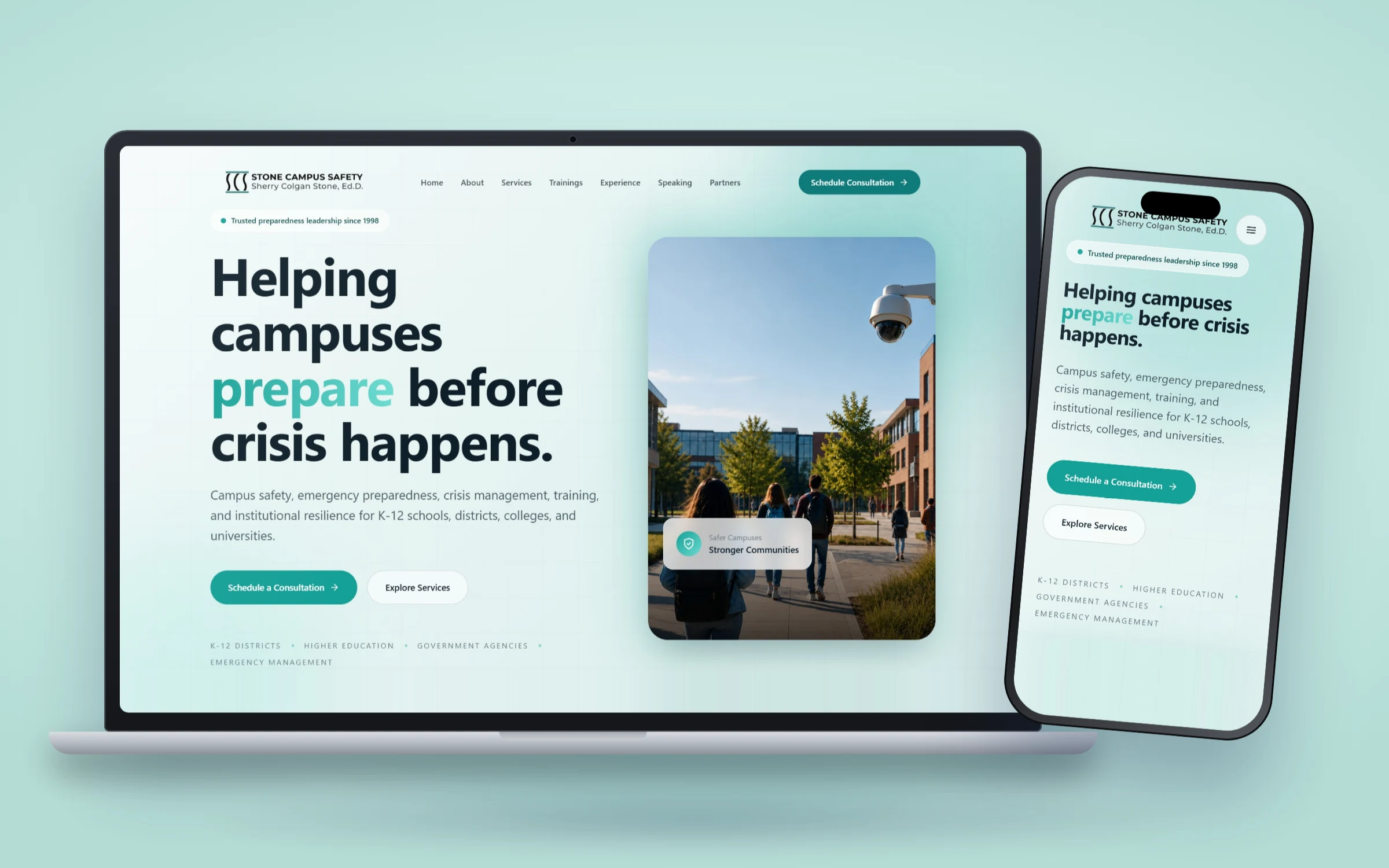
Dr. Sherry Colgan Stone, Ed.D. advises school districts, colleges, universities and government agencies on preparedness, crisis management and training. Most safety sites in this space are dark and fear driven. This one deliberately isn’t. The headline is “Helping campuses prepare before crisis happens,” and the imagery shows bright campus scenes and students rather than threats.
What it gets right: a stats card just below the hero, a personal “Our Story” section, a four phase method (Discover, Design, Practice and Sustain), and a standards section naming DHS, FEMA, NIMS, ICS and SEMS. That last part matters. Public sector buyers are measured against those frameworks, so seeing them named answers a procurement question before it’s asked.
Lesson to copy: Name the standards, frameworks or regulations your buyers answer to. It tells them you speak their language.
9. JT Public Relations
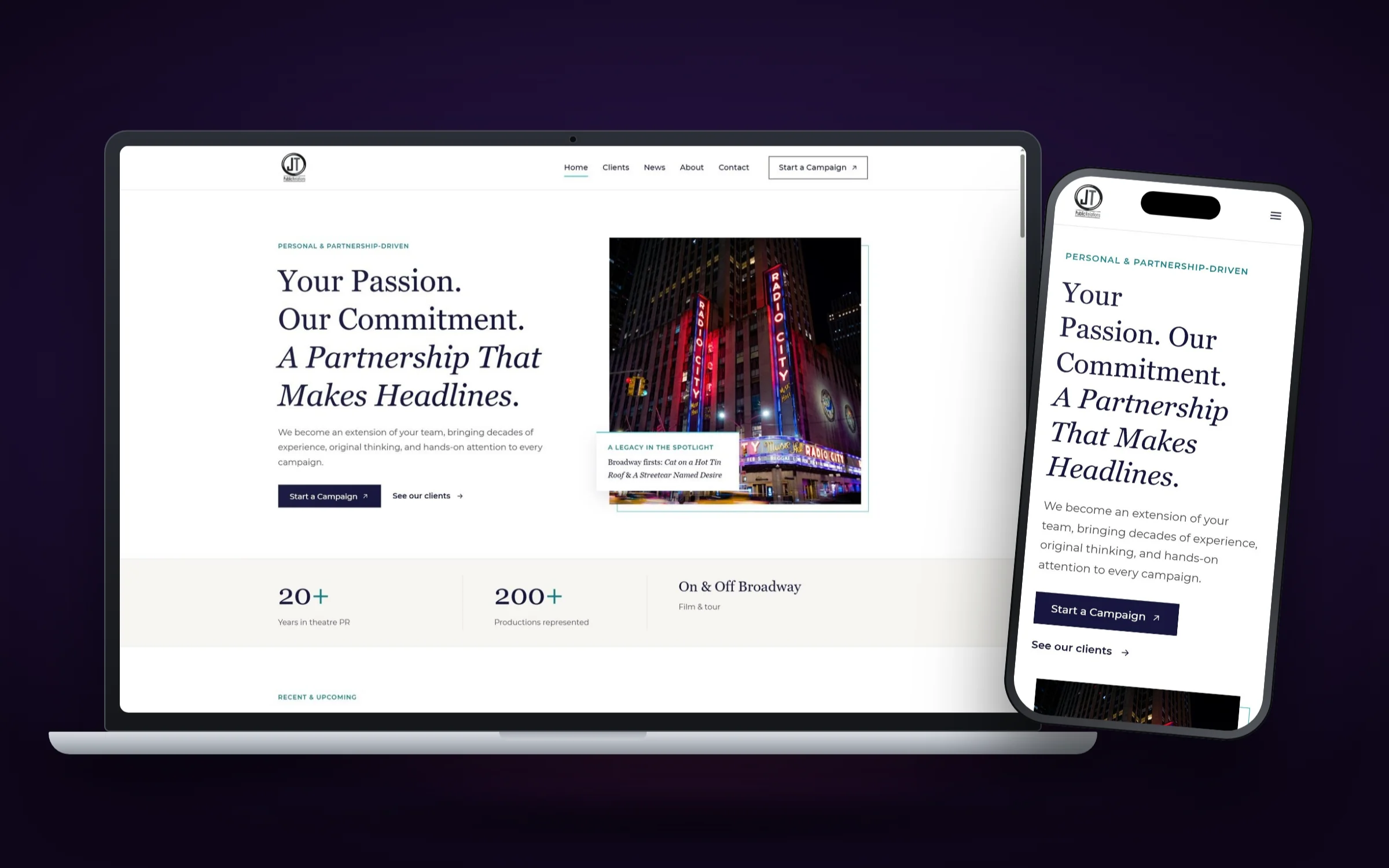
Joe Trentacosta’s firm has more than twenty years in theatre PR and ran campaigns for landmark Broadway productions. The old site had a “Latest News” heading with nothing under it, a loose collage of Playbill covers with no dates, and no introduction to Joe on the homepage.
What it gets right: the new headline is “Your Passion. Our Commitment. A Partnership That Makes Headlines.” A stats band shows 20+ years and 200+ productions represented. A “Now playing and coming soon” grid lists current shows with venues and run dates, and client news cards show recent coverage. Joe has his own founder section. The closing line, “Have a show opening? Let’s get it talked about.”, speaks directly to the buyer’s moment.
Lesson to copy: Show current, dated work. A site that looks active tells buyers you’re busy for a reason.
10. Westshore E.M.R.
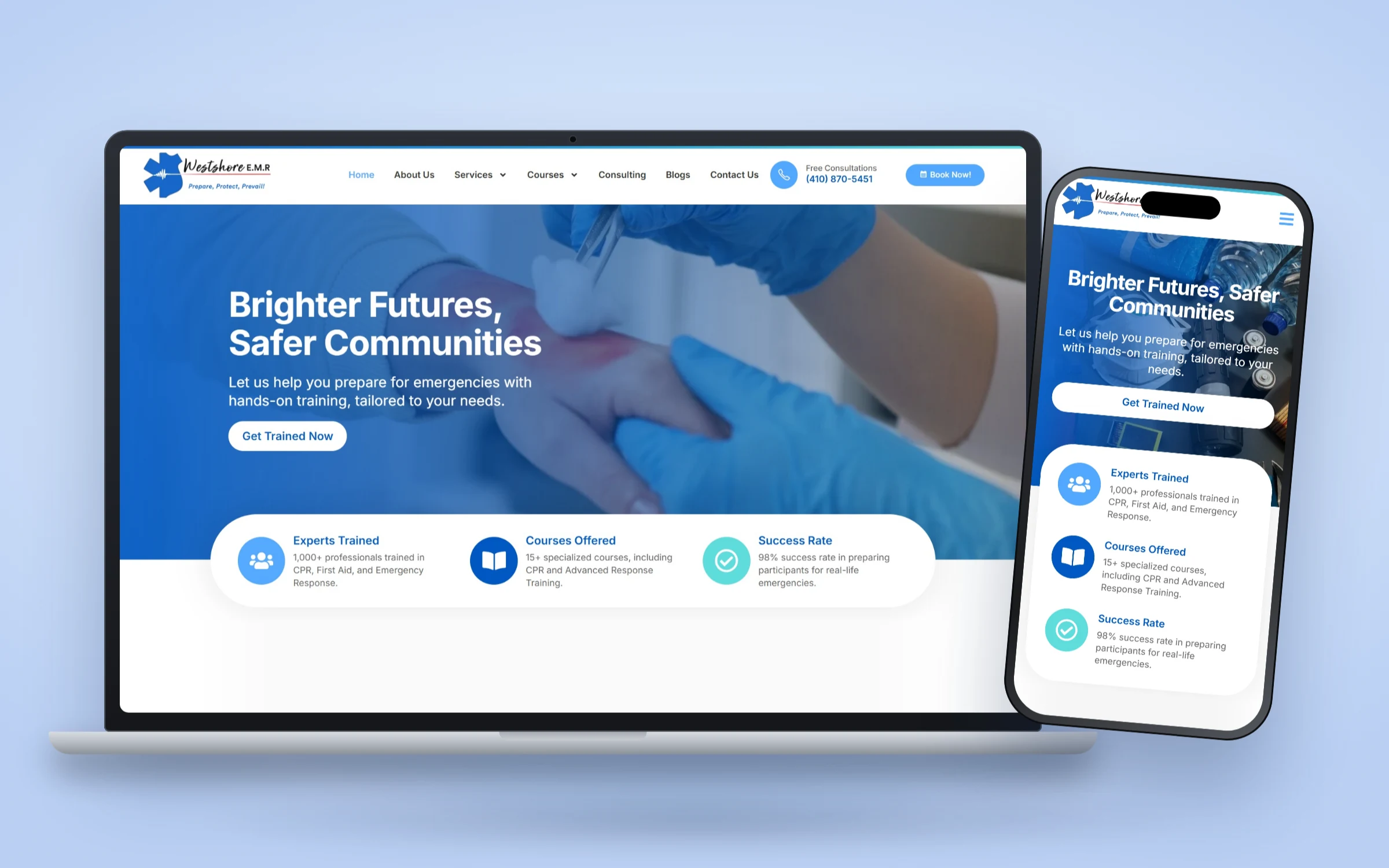
Westshore E.M.R., led by Jason Cowger, teaches CPR, AED, first aid and advanced response, and offers AED inspections and onsite first aid support. It’s training more than consulting, but it belongs on this list because its buyers behave like many consulting buyers: employers and school staff who need something done by a date.
What it gets right: a quick facts proof bar directly under the hero, course paths for each type of training, a founder card, real reviews and certifications, and a phone number plus Book Now button in the header. On mobile, a full width “Get Trained Now” button sits within thumb reach.
Lesson to copy: If your buyers often arrive with a deadline, shorten the path. Phone number in the header, booking button after every section.
What the best consulting websites have in common
Look across these ten consulting website examples and the same patterns keep showing up. None of them depend on budget or a fancy platform.
- A headline about the client. Every site names the audience or outcome in the first line. None open with “Welcome to our website.”
- Proof before the scroll. Stats, credentials, media logos or named testimonials sit within the first screen or just below it.
- One main action, repeated. “Schedule a Consultation,” “Request a Confidential Consultation,” “Apply Now.” The wording changes, but each site picks one and repeats it in the header, the hero and after key sections.
- The founder on the homepage. For a consulting firm, the expert is the reason people buy. Every example introduces the person early.
- A visual tone that matches the buyer’s mood. Calm teal for campus safety, dark editorial for threat assessment, playbill elegance for theatre PR, bright and quick for training.
- Mobile first screens that still work. Headline, short summary and a big button before the first scroll on a phone.
Notice what’s missing too. No slider carousels in the hero. No stock photos of handshakes. No vague “solutions” language. If your current site leans on those, our list of small business website mistakes covers what to replace them with.
How to use these examples on your own site
Don’t copy a whole design. Copy one move at a time, starting with the one that fixes your biggest gap. If visitors don’t know who you are, start with the headline and founder section. If they know but don’t act, fix your call to action. If they hesitate, add proof near the first button.
Then check the rest with our website checklist for consultants, and if your homepage is the weak spot, our guide to homepage design best practices goes section by section. You can browse more full projects in our website design case studies.
Frequently asked questions
What makes a good consulting website?
A clear headline naming who you help, proof near the first call to action, one main action repeated through the page, the founder visible early and a mobile layout that keeps the button within reach. Design style matters less than those basics.
How many pages does a consulting website need?
Most solo consultants and small firms do well with a homepage, about page, one page per main service or audience, a proof page (case studies, media or credentials) and a contact page with booking. Add pages when you have a distinct buyer or service to explain.
Should a consulting website show prices?
It depends on how you sell. Most of the expert firms in these examples don't publish prices because each engagement is scoped individually. A free consultation or strategy call is the usual next step instead.
What platform are these consulting websites built on?
The sites with case studies here were built on WordPress with Elementor, which lets the client edit text, add pages and publish insights without a developer. The right platform depends on how much you want to edit yourself.
How do I make my consulting website look more credible?
Show specific, checkable proof: years of experience, credentials, named testimonials with titles, media appearances with dates and affiliations. Put it near the first button, and use real photos of yourself instead of stock images.
Where can I find more consulting website examples?
Browse our website design case studies for full before and after breakdowns of sites for consultants and expert firms, including the reasoning behind each design decision.
Find the one move your site is missing
Every site on this list started with the same question: what does the right visitor need to see in the first ten seconds to feel confident booking a call? The answers differ by audience, but the principle doesn’t. Pick the example closest to your practice, borrow its strongest move and test it on your own homepage.
If you’d rather have help, see our website design services or get in touch. We’ll design a free homepage concept for your firm before you pay anything.
