Westshore E.M.R. offers CPR, first aid, AED and emergency response training for individuals, schools and organizations. This CPR training website design focused on clarity: help every visitor find the right course and book it without friction.
Individuals, school nurses, employers and organizations that need certified training.
Make courses easy to understand and booking or calling effortless.
A bright, trustworthy design with visible proof and booking at every step.
Westshore E.M.R. is an emergency response training company founded by Jason Cowger, with more than two decades of experience in emergency preparedness and life saving skills training. The team teaches CPR, AED, first aid, trauma care and advanced response courses.
Its students include individuals who need certification for work, school nurses and staff, employers building safer workplaces and community groups. Westshore also offers AED inspections and maintenance, safety equipment sales and onsite first aid support for events.
Because many people need training on a deadline, the website had to make courses easy to compare and booking fast, while showing the experience and reviews that make people feel confident choosing Westshore.
People looking for CPR or first aid training usually have a deadline. A school needs staff certified, an employer needs a compliant team, or an individual needs a card for a new job. They want to know which course fits and how to book it, fast.
Clever design would only slow them down. The website needed to be clear, friendly and credible, with proof of experience and simple ways to book or call on every page.
Every choice on this project was made to build trust quickly and guide the right visitor to a conversation.
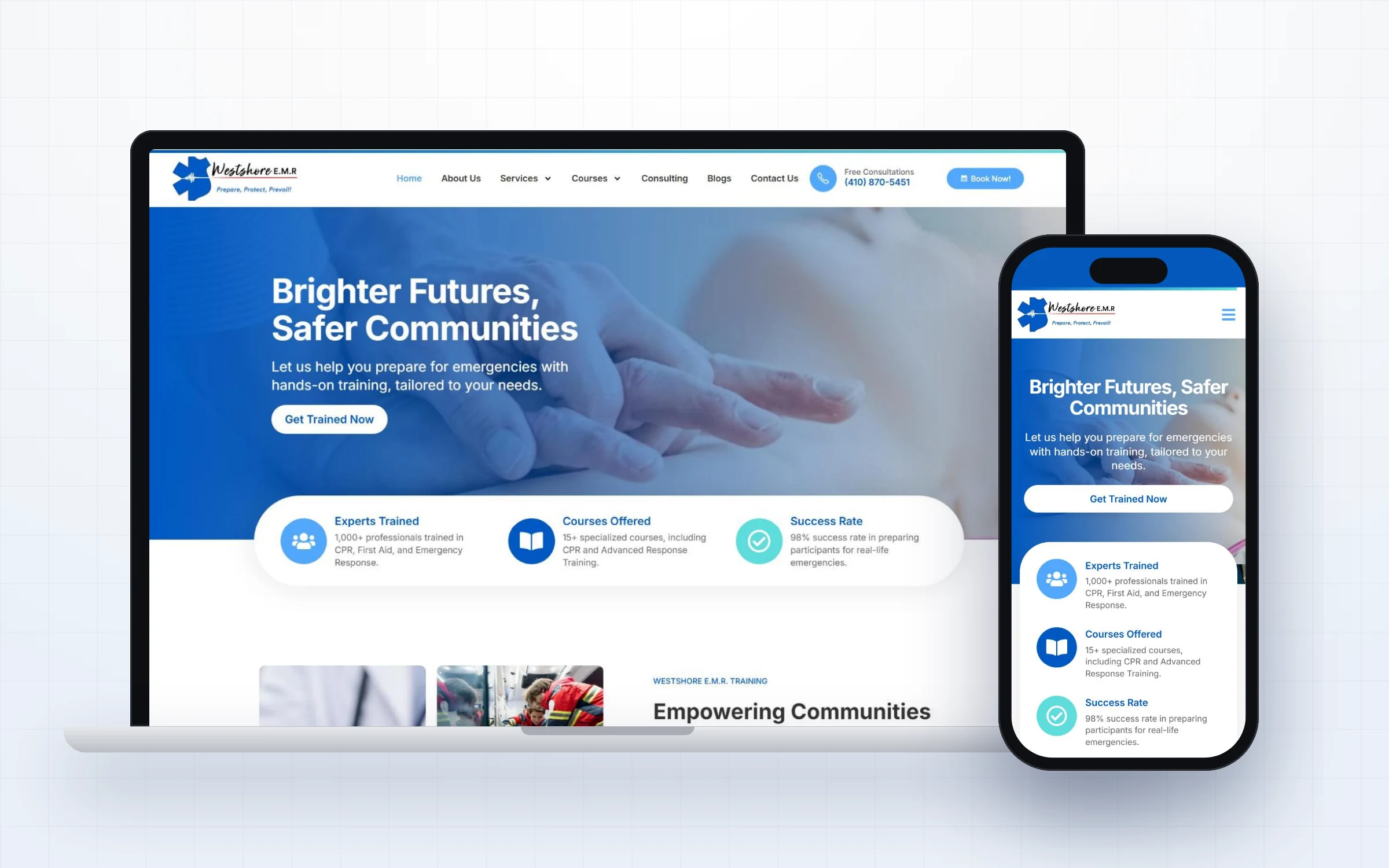
The headline, Brighter Futures, Safer Communities, speaks to why the training matters, while the subheading explains exactly what is offered.
Quick facts on professionals trained, courses offered and success rate answer the first question every visitor has: can I trust them?
Book Now and the phone number stay in the header, and booking buttons appear after every major section.
A founder card for Jason Cowger and real client testimonials with a 5.0 rating build personal trust.
The site was built with clean structure and now supports an ongoing SEO program that helps new students find courses in local search.
Great websites are planned around how people actually decide. This CPR training website design walks every visitor through four simple stages.
A clear headline tells visitors within seconds that they are in the right place and that Westshore E.M.R. understands their situation.
Short sections explain the services in plain language, so visitors know exactly what is offered and who it is for.
Credentials, real experience and proof appear right where doubts usually come up, before the visitor has to ask.
The main button, Book Now, is always within reach, so a ready visitor can take the next step in one click.
Most websites in this space lose enquiries for the same few reasons. Here is what we deliberately designed out of this CPR training website design.
Here is the complete homepage presented section by section, so you can see how the story flows from first impression to final call to action.
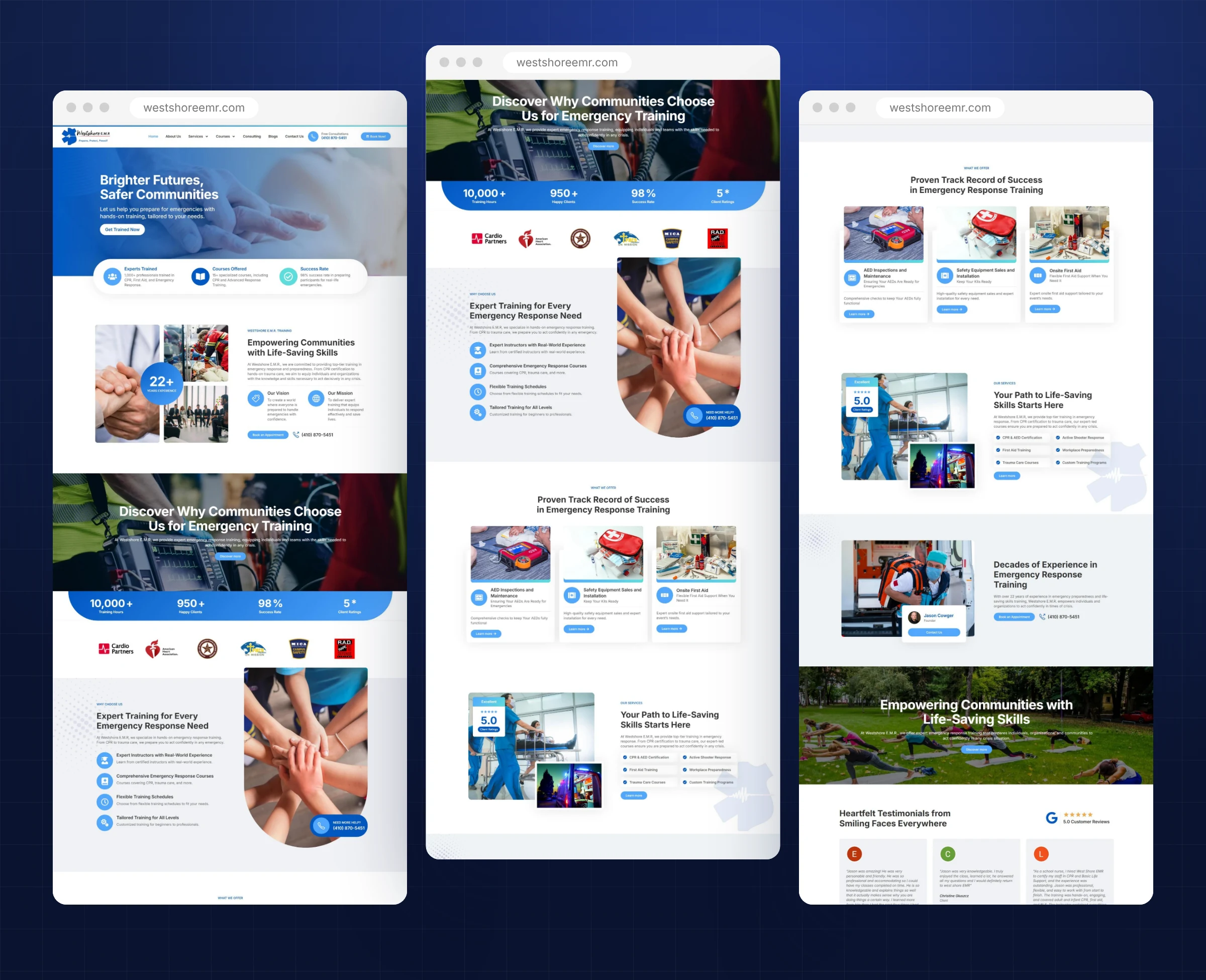
The complete CPR training website design, presented section by section.
Here is everything included in this CPR training website design project, from first strategy call to launch day. Each piece was designed to work together, so visitors move naturally from first impression to a confident decision without friction or confusion.
Clear paths to CPR, first aid, AED and advanced response training.
Book Now and call options visible on every screen.
AED inspections, safety equipment and onsite first aid explained simply.
Certifications, partner logos and founder experience placed up front.
Real testimonials with a visible 5.0 client rating.
Structure and content ready for ongoing search growth.
A consistent visual language is what makes a website feel premium. For this CPR training website design, every color, font and image choice supports one goal: trust.
A bright, trustworthy blue with soft aqua highlights. The palette feels medical and friendly at the same time, which suits community training.
A clear, modern sans serif throughout. Large headings and short paragraphs keep the information easy to read on any screen.
Real training moments, equipment and people working together. The photos show exactly what students will experience in class.
Rounded cards, icon highlights and repeated booking buttons, so visitors always know where to go next.
Most training searches happen on a phone. The mobile layout keeps the headline short, makes Get Trained Now a full width button and turns the proof points into a clean stacked card that is easy to read with one thumb.
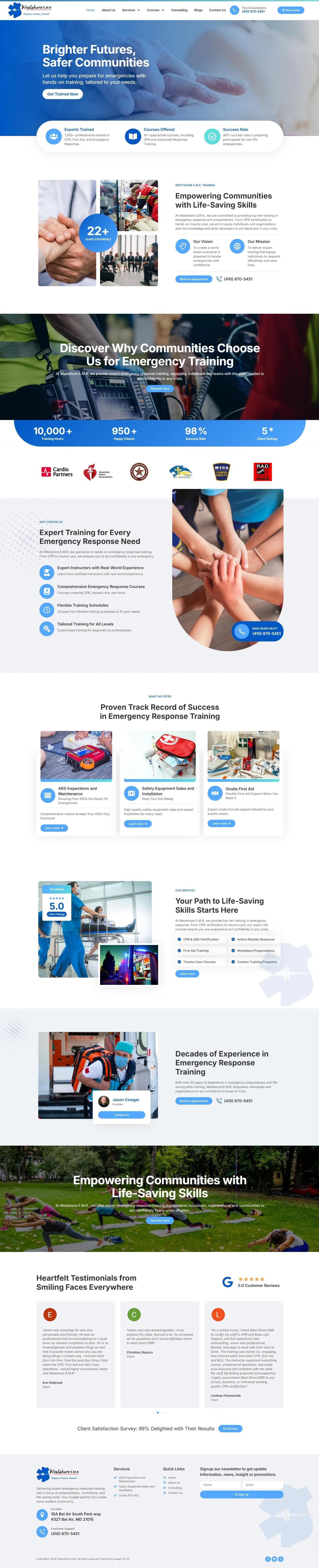
Scroll inside the window to explore the complete CPR training website design.
Every project follows the same clear five step process, so clients always know what happens next and nothing is left to chance.
We started with a focused conversation about Westshore E.M.R., the people it serves and the questions those buyers ask before they reach out. That conversation became the brief for the CPR training website design.
Before any commitment, we designed the homepage so Westshore E.M.R. could see the direction, the message and the visual style. Feedback at this stage shapes everything that follows.
Once the concept was approved, we designed the remaining pages with the same system, keeping navigation simple and every page focused on one clear next step.
We built the CPR training website design in WordPress with Elementor, then tested every page on phones, tablets and desktops, checking speed, forms, links and readability.
At launch we connected analytics and Search Console, checked indexing and handed over a site the team can update with confidence, with ongoing support whenever it is needed.
Because the homepage concept comes first, there are no surprises later. Westshore E.M.R. saw the direction early, shaped it with honest feedback and moved into the full build with confidence. That same rhythm of design, review and refine continued until every page felt right, and it is the reason our clients describe the process as calm and easy to follow.
A good CPR training website design respects the visitor's time. People arrive with a clear need and often a deadline. By putting proof and booking side by side, and keeping the design bright and friendly, this site turns a quick search into a confident booking.
Just as important, the website now works as a long term business asset rather than a static brochure. It explains the offer clearly to new visitors, supports referrals from people who already know Westshore E.M.R., and gives every marketing effort, from LinkedIn posts to speaking events, a credible place to send people. When someone hears about Westshore E.M.R. and looks them up, the website confirms everything they hoped to find.
Want to see more? Browse our full web design portfolio, learn how our website design services work, or check your own site against our free website checklist for consultants. You can also view the live Westshore E.M.R. website.
Premium design needs a solid foundation. Here is how this CPR training website design is built and maintained.
A flexible, widely supported platform that gives Westshore E.M.R. full ownership of the website and its content.
Custom built sections and widgets keep the design consistent while making everyday edits simple.
Reliable hosting, page caching and compressed modern images keep pages quick for every visitor.
Connected tracking shows how people find and use the site, so decisions about content are based on real data.
Every section answers a real question that clients of Westshore E.M.R. ask before they reach out, in the order they usually ask it.
Proof, credentials and a calm, confident visual style work together so the expertise behind the site is obvious at a glance.
A reusable component system and ongoing care keep the website current, fast and on brand as the business grows.
A beautiful website only works if the right people can find it. Search visibility and speed were part of this CPR training website design from the first page, not added at the end.
If you work in a similar field, these lessons from the CPR training website design for Westshore E.M.R. can help you win more of the right clients from your own website.
Visitors want to know what you teach and whether you are credible. Put courses and proof right below the headline.
Training buyers often have deadlines. A Book Now button and phone number on every screen turn urgency into action.
A visible star rating and named testimonials do more to build trust than any claim you could write yourself.
A founder card and instructor experience help students feel comfortable before they arrive in class.
For training businesses, most customers search locally. Clean structure and ongoing SEO keep new students finding you.
If your clients are careful, senior or under pressure, the principles behind this CPR training website design apply to your business too. Buyers like these rarely decide in a single visit. They come back, compare two or three names and look for signs that you understand their situation better than anyone else.
That is why we start every project the same way: a short call to understand your audience, then a free homepage concept built around the exact questions your best clients ask. You see the direction before you commit to anything, and the finished site is built so you can keep it fresh long after launch.
Whether you need a new CPR training website design or a refresh of an existing site, the goal is the same: a clear message, visible proof and an easy next step on every screen.
You do not need to have every answer before we talk. Bring your goals, your best client stories and any questions you have. We will turn them into a clear plan, a homepage concept you can see and react to, and a website that represents your expertise with the same care you give your own clients.
Answers to the questions we hear most about this CPR training website design and how we work.
Yes. It was designed for mobile first use, with large tap targets and booking buttons always within reach.
Yes. New course and service pages follow the same layout, so the site grows without losing consistency.
Yes. Westshore now works with us on ongoing SEO to keep the site visible in local search.
A custom site presents your courses clearly, builds trust with reviews and certifications and turns searches into bookings.
Yes. We can link or embed the booking tool you prefer and keep booking buttons visible throughout the site.
We set up clean page structure, location details, fast loading and ongoing content so the site keeps improving in local results.
Yes. Our monthly care plans cover updates, new pages and technical health.
Usually a short discovery call, a review of the homepage concept and quick feedback on the remaining pages. We handle the design, build and technical setup.
Yes. The website, its content and its design are yours, built on WordPress so you are never locked in.
Book a free strategy call. We will talk through your goals and then design your homepage concept before you commit to anything.
Yes. Design Fly 24 is a full service agency, so the same team that builds your website can grow it with SEO, Google Ads management, LinkedIn branding, email marketing and monthly website care. One point of contact, one plan, and everything working together to bring you clients.
Tell us about your work and we will design your new homepage free. If you love it, we build the rest. If not, you owe nothing.